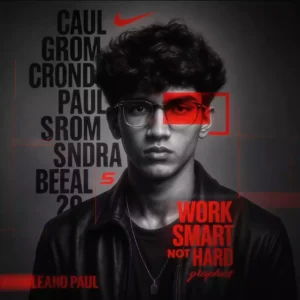
a man with work smart with one eye red ai photo

Advertisement
a man with work smart with one eye red ai photo - AI Generated Image
AI Prompt Used

HYPER-DETAILED GRAPHIC DESIGN FEATURING A STRIKING PORTRAIT OF A YOUNG MAN WITH THE SAME FACE AS UPLOADED] WITH A CONFIDENT DEMEANOUR. HIS HEAD IS ADORNED WITH VOLUMINOUS, ADDING TEXTURE AND DEPTH TO THE COMPOSITION. THE PORTRAIT IS RENDERED IN A HIGH-CONTRAST BLACK-AND-WHITE STYLE, STANDING OUT AGAINST THE MINIMALIST BACKGROUND. HIS EXPRESSION IS CALM YET DETERMINED, WITH ONE EYE PARTIALLY OBSCURED BY A BOLD RED RECTANGULAR OVERLAY THAT ADDS A MODERN, ARTISTIC FLAIR. THE BACKGROUND IS A SMOOTH, TEXTURED GREY CANVAS. SERVING AS A NEUTRAL BACKDROP THAT ENHANCES THE FOCAL ELEMENTS. OVERLAID VERTICALLY ALONG THE LEFT SIDE OF THE IMAGE, THE WORD "PAUL SOMENDRA IS REPEATED IN LARGE, BOLD BLACK LETTERS WITH A SLIGHT TRANSPARENCY EFFECT. CREATING A LAYERED, DYNAMIC LOOK INTERSPERSED WITHIN THIS TEXT ARE ICONIC DESIGN ELEMENTS: A PROMINENT NIKE LOGO IN RED NEAR THE TOP. A STYLIZED RED "S" LOWER DOWN, AND A VERTICAL RED LINE THAT PUNCTUATES THE DESIGN. TO THE RIGHT. A RED GEOMETRIC FRAME SURROUNDS THE OBSCURED EYE, DRAWING ATTENTION TO THE INTERPLAY OF COLOUR AND FORM. AT THE BOTTOM RIGHT. THE PHRASE "WORK SMART NOT HARD" IS WRITTEN IN BOLD RED CAPITAL LETTERS, WITH "SMART" IN A SMALLER, ELEGANT CURSIVE SCRIPT BENEATH IT SIGNED OFF WITH "GRAPHICS" IN A MATCHING STYLE, SUGGESTING A PERSONAL OR BRAND SIGNATURE. THE BOTTOM LEFT CORNER FEATURES THE HASHTAG #PAUL" IN RED. REINFORCING THE IDENTITY THEME. THE YOUNG MAN'S ATTIRE, A PARTIALLY VISIBLE BLACK LEATHER JACKET WITH AN OPEN COLLAR, ADDS A RUGGED YET STYLISH EDGE TO THE OVERALL AESTHETIC. THE LIGHTING IS SOFT YET DRAMATIC. HIGHLIGHTING THE TEXTURES OF HIS HAIR AND JACKET, WHILE THE RED ACCENTS POP VIVIDLY AGAINST THE GRAYSCALE TONES, CREATING A COHESIVE, HIGH-ENERGY VISUAL THAT BLENDS STREETWEAR CULTURE WITH GRAPHIC ARTISTRY. PHOTOREALISTIC, SHALLOW DEPTH OF FIELD, HIGH-RESOLUTION DSLR QUALITY, HASSELBLAD X2D 100C, SHALLOW DEPTH OF FIELD. SHARPLY FOCUSED ON ME.4:5 ASPECT RATIO. MAKE IT 8K ULTRA REALISTIC HYPER DETAILED
Advertisement

Discover Superior Results With The Help Following Ai Option

Google Gemini AI has emerged as the go-to solution for transforming everyday content into visually striking digital masterpieces. Whether you want high-quality outputs, creative solutions, or professional results, Google Gemini AI's innovative prompts enable you to control every aspect of your creative vision with precision with AI-powered precision. This curated collection of prompts is tailored for creators, professionals, and AI enthusiasts who want more than just basic AI generation; it's for those eager to explore creative possibilities, enhance professional work, and stay ahead of AI trends using Gemini AI's advanced capabilities. Every prompt features cutting-edge approaches like AI, prompt, image generation, making it easy to consistently produce high-quality, trend-aware content. With Gemini AI's powerful generation engine, straightforward inputs can become professional-quality outputs that reflect precision, style, and modern aesthetics.

How To Edit Your Photo Using This Prompt

1
Access the Platform: Access Google Gemini AI through the browser interface, mobile application, or integrated Google Workspace tools.
2
Prepare Your Input: Have a clear objective and specific requirements in mind to guide the AI generation process effectively.
3
Use Your Prompt: Input your prompt directly into the generation interface. Try: "HYPER-DETAILED GRAPHIC DESIGN FEATURING A STRIKING PORTRAIT OF A YOUNG MAN WITH THE SAME FACE AS UPL". Use descriptive language and be specific about your desired outcome.
4
Customize Details: Be specific about style, quality, context, and any special requirements. Include both what you want and what you want to avoid.
5
Generate and Refine: Initiate generation and monitor the progress. The platform will provide multiple options that you can refine or regenerate as needed.
6
Finalize and Export: Choose the best result and export in your desired format and resolution. The platform provides options for different applications and platforms.

Expert Tips for Best Results

  • Be Descriptive: Use specific, detailed language rather than vague or abstract terms.
  • Provide Context: Include the purpose, audience, and intended use of the generated content.
  • Use Examples: Reference similar works, styles, or outcomes you're trying to achieve.
  • Iterate Systematically: Make small, specific changes between generations to understand what works.
  • Balance Specificity and Flexibility: Be specific about what matters most, but allow creative freedom elsewhere.
  • Learn Platform Nuances: Understand the specific strengths and limitations of your chosen AI platform.
  • Document Successful Prompts: Keep a record of what works well for future reference and consistency.

Recommended AI Tools

ChatGPT

Versatile all-around AI assistant for various tasks

Midjourney

Leading AI image generation platform

DALL-E 3

Advanced image generation with strong prompt understanding

Claude

Excellent for complex reasoning and content creation

Usage Tips

  • Be specific and detailed in your modifications
  • Test the prompt across different AI platforms
  • Keep a log of successful variations and parameters
  • Understand the limitations of each AI model
  • Iterate and refine based on initial results

Optimization Tips

  • Use specific, descriptive language in your prompts for better AI understanding
  • Include relevant keywords like 'AI', 'prompt' for targeted results
  • Experiment with different parameter combinations to optimize outputs
  • Save successful prompt variations for future reference and refinement
  • Stay updated with the latest AI model capabilities and limitations
Advertisement

You Might Like:

Quick Unique Best Match
Loading Prompt Seen...