Karwa chauth google gemini prompt for couple

Advertisement
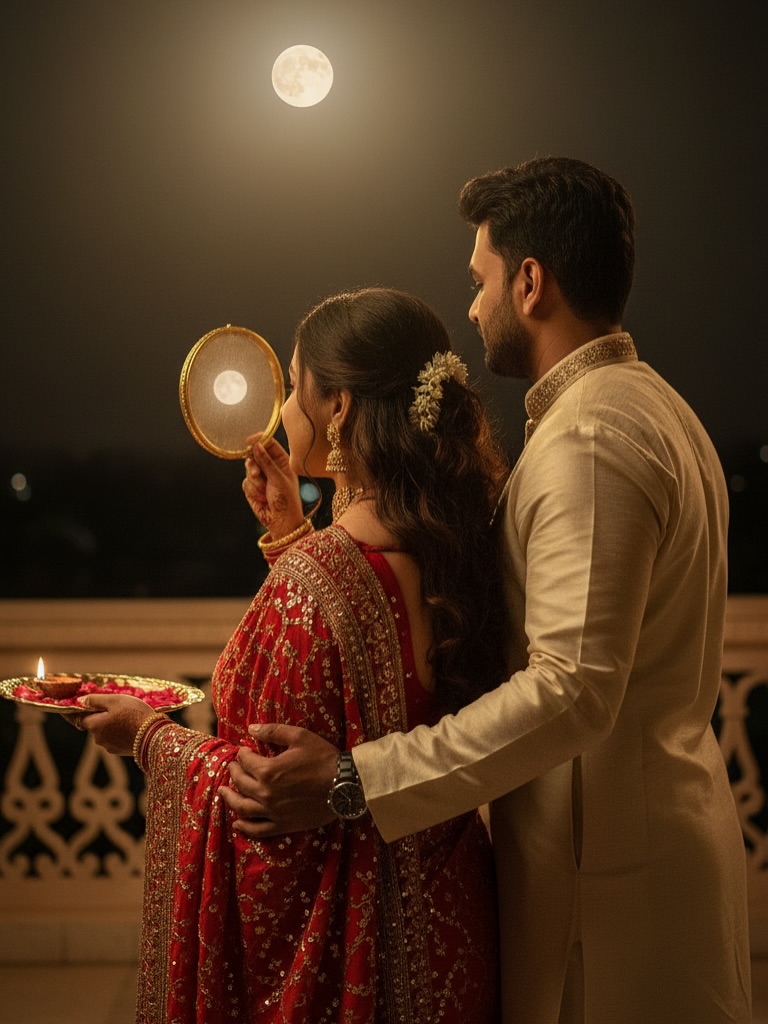
Karwa chauth google gemini prompt for couple  - AI Generated Image
AI Prompt Used

site mode button Top 10 Karwa Chauth Ai Photo Editing Prompt | Karwa Chauth Gemini Prompt Free Prompt Ai Photo Editing October 2, 2025VM EditorLeave A CommentOn Top 10 Karwa Chauth Ai Photo Editing Prompt | Karwa Chauth Gemini Prompt Free Prompt Top 10 Karwa Chauth Ai Photo Editing Prompt – So friends, Navratri is over now. You guys tried AI photo editing during Navratri, but that trend is over now. Karva Chauth is coming, which is on October 10th. You can generate such a photo from your normal photo, that too in just one click. Such Karva Chauth AI photo editing. Using just a selfie image of your girlfriend or boyfriend or husband or wife, you can generate such an image. In this post, I am going to give you many such Karva Chauth photo editing methods, using which you will be able to generate such photos in different poses and different styles. To create such a photo, you do not need any professional editing. You can generate such an image using an AI tool, that too absolutely free. I am going to give you all these prompts and I will also tell you step by step how to generate such an image. So, please read this article carefully. Details Karwa Chauth Ai Photo Editing Prompt You must have seen that such Karwa Chauth AI photo editing is going viral very fast on Instagram and you can also generate such a photo very easily through just one prompt. If you cannot come to your home on the day of Karwa Chauth, your wife is away or you are away or your girlfriend is away, then you can generate such an image using your normal selfie and a girl’s selfie, which will look absolutely realistic and you can also post that image on your WhatsApp story etc. and if you send it to your wife or girlfriend, she will also be very happy. So how will you generate such an image in which your face will also match hundred percent? In this post, I will tell you everything in detail. Discover more Image editing Gemini Gemini Ai ai Artificial intelligence Photo Edit Ai photo editing AI Photo Editing Top 10 Karwa Chauth Ai Photo Editing Prompt | Karwa Chauth Gemini Prompt Free Prompt A high-quality, cinematic shot of a young, stylish Indian couple celebrating Karwa Chauth on a luxurious, royal-looking terrace at night. The woman, wearing an ornate traditional gold-sequined red saree and intricate 90s-style gold jewelry including a choker, earrings, and bangles, holds a medium size rich look chalni and a pooja thali with a lit diya, who is wearing a cream colour royal-style kurta pajama. The girl is looking at the chand through the sieve, and she stand like backside and sieve in front side see the chand like in the Karwa Chauth ritual where the moon is first seen through the chalni. Girl Hair-replace the original hair with a digital image of dark brown wavy curly long hair and tuck a small gajra into the curls for a romantic touch. The scene is lit with a warm, dark golden light that casts deep, dramatic shadows and high contrast, giving it a moody, vintage feel. The background features a textured wall and a subtle crescent moon in the night sky, creating a rich and aesthetic atmosphere. The final image should look like the reference image where base image – start with the original image ensuring the facial features remain unchanged. Girl and boy face features remain the same.
Advertisement

Discover Superior Results With The Help Following Ai Option

Google Gemini AI has emerged as the go-to solution for transforming everyday content into visually striking digital masterpieces. Whether you want professional-grade photography, realistic portraits, or cinematic scenes, Google Gemini AI's innovative prompts enable you to control lighting, composition, camera settings, and mood with AI-powered precision. This curated collection of prompts is tailored for photographers, content creators, and visual storytellers who want more than just basic AI generation; it's for those eager to enhance photographic skills, create professional portfolios, and produce stunning visual content using Gemini AI's advanced capabilities. Every prompt incorporates current visual trends including karwa, chauth, google, blending professional photography principles with AI-enhanced creativity. With Gemini AI's powerful generation engine, straightforward inputs can become professional-quality outputs that reflect precision, style, and modern aesthetics.

How To Edit Your Photo Using This Prompt

1
Access the Platform: Access Google Gemini AI through the browser interface, mobile application, or integrated Google Workspace tools.
2
Prepare Your Input: Upload your photo on respective AI . Ensure you have specific lighting, composition, and style requirements in mind.
3
Use Your Prompt: Input your prompt directly into the generation interface. Try: " site mode button Top 10 Karwa Chauth Ai Photo Editing Prompt | Karwa Chauth Gemini Prompt Free ". Use descriptive language and be specific about your desired outcome.
4
Customize Details: Define camera settings, lighting conditions, focal length, and photographic style. Mention specific techniques or equipment if relevant.
5
Generate and Refine: Initiate generation and monitor the progress. The platform will provide multiple options that you can refine or regenerate as needed.
6
Finalize and Export: Choose the best result and export in your desired format and resolution. The platform provides options for different applications and platforms.

Expert Tips for Best Results

  • Define Lighting Conditions: Specify 'golden hour', 'studio lighting', 'natural light', or 'dramatic shadows' for mood control.
  • Mention Camera Equipment: Reference specific cameras, lenses, or photographic equipment for authentic results.
  • Set the Scene: Describe backgrounds, environments, and atmospheric conditions in detail.
  • Control Depth of Field: Use terms like 'shallow depth of field', 'bokeh background', or 'everything in focus'.
  • Specify Photo Style: Mention 'portrait photography', 'landscape', 'street photography', or 'commercial shoot'.
  • Include Technical Details: Reference ISO, aperture, shutter speed, or film types for realistic rendering.
  • Consider Post-Processing: Mention desired editing styles like 'vintage filter', 'high contrast', or 'natural colors'.

Recommended AI Tools

ChatGPT

Superior at understanding photographic terms and realistic rendering

Google Gemini

Strong research capabilities and factual accuracy

Stable Diffusion

Best for photorealistic outputs with custom models

Midjourney

Excellent for artistic photography styles and compositions

Usage Tips

  • Specify camera types and lenses for different photographic effects
  • Use lighting terms like 'golden hour' or 'studio lighting'
  • Experiment with different film types and processing styles
  • Add compositional rules like 'rule of thirds' explicitly
  • Include depth of field requirements for focus control

Optimization Tips

  • Use specific, descriptive language in your prompts for better AI understanding
  • Include relevant keywords like 'karwa', 'chauth' for targeted results
  • Experiment with different parameter combinations to optimize outputs
  • Save successful prompt variations for future reference and refinement
  • Stay updated with the latest AI model capabilities and limitations
Advertisement

You Might Like:

Quick Unique Best Match
Loading Prompt Seen...