
transform your ordinary photo to Stylish looking celebration

Advertisement
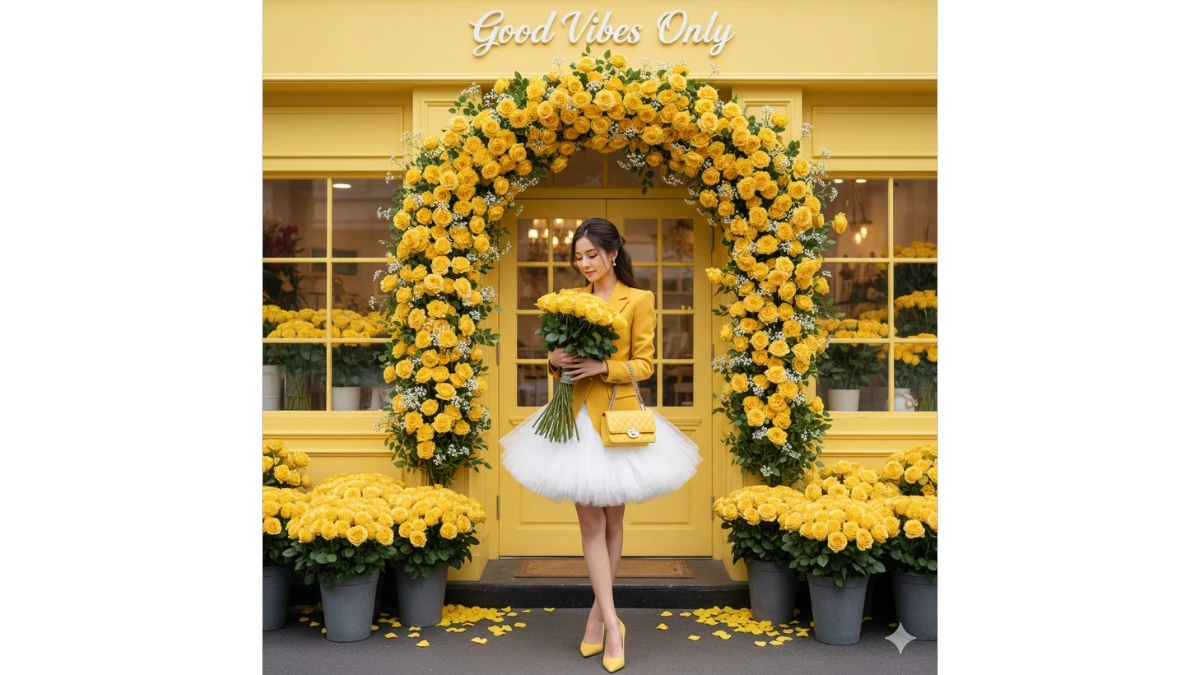
transform your ordinary photo to Stylish looking celebration - AI Generated Image
AI Prompt Used

"Transform this image [upload your image] into a 64K ultra-high-resolution DSLR-style full-body portrait of a young woman, maintaining the same face as the uploaded image. She stands gracefully in front of a charming yellow flower shop, holding a large bouquet of bright yellow roses that radiate warmth and romance. Her long, dark hair is styled in a soft half-updo, with loose strands framing her face as she gazes down at the bouquet with a gentle, serene expression. She wears a vibrant mustard or lemon-yellow blazer with a structured silhouette and slightly puffed shoulders, paired with a voluminous white tulle or tutu skirt that contrasts beautifully against the bright top, revealing her slender legs. Matching yellow pointed-toe heels and a small quilted yellow shoulder bag with a silver chain strap complete her stylish, modern look. The flower shop backdrop is painted a delightful pastel yellow, creating a cohesive, dreamy aesthetic. A magnificent floral archway of vivid yellow roses and delicate white baby’s breath frames the entrance, with elegant white script above reading “Good Vibes Only.” Large display windows on either side reveal more yellow blooms inside, enhancing the theme. The double yellow doors feature subtle decorative details, while gray planters overflowing with yellow roses sit at the base, surrounded by soft petals scattered on the dark ground, adding a romantic touch. The lighting is bright and natural, evoking the feel of a sunny outdoor day, with rich, saturated colors and soft shadows that enhance the vibrancy of the flowers and the woman’s outfit. The overall atmosphere is cinematic and elegant, rendered in an ultra-realistic Octane Render and Unreal Engine 5 style — capturing the charm, fashion, and timeless beauty of a romantic floral scene."
Advertisement

Discover Superior Results With The Help Following Ai Option

ChatGPT has become the industry standard for prompt understanding and realistic image generation with exceptional attention to detail. Whether you want professional-grade photography, realistic portraits, or cinematic scenes, ChatGPT's innovative prompts enable you to control lighting, composition, camera settings, and mood with AI-powered precision. This curated collection of prompts is tailored for photographers, content creators, and visual storytellers who want more than just basic AI generation; it's for those eager to enhance photographic skills, create professional portfolios, and produce stunning visual content using DALL-E 3's advanced capabilities. Every prompt incorporates current visual trends including transform, your, ordinary, blending professional photography principles with AI-enhanced creativity. Using DALL-E 3's sophisticated understanding capabilities, basic descriptions transform into photorealistic images that demonstrate exceptional detail and coherence.

How To Edit Your Photo Using This Prompt

1
Access the Platform: Open ChatGPT with DALL-E integration or access DALL-E directly through the OpenAI platform. Use the web interface or mobile application.
2
Prepare Your Input: Upload your photo on respective AI . Ensure you have specific lighting, composition, and style requirements in mind.
3
Use Your Prompt: Enter your prompt in the generation field. Use: ""Transform this image [upload your image] into a 64K ultra-high-resolution DSLR-style full-body port". Specify style, quality, and any specific requirements in natural language.
4
Customize Details: Define camera settings, lighting conditions, focal length, and photographic style. Mention specific techniques or equipment if relevant.
5
Generate and Refine: Click the generate button and review the created images. You can request variations or make specific edits to the generated content.
6
Finalize and Export: Select your preferred output and download in high resolution. The platform offers different quality settings for various use cases.

Expert Tips for Best Results

  • Define Lighting Conditions: Specify 'golden hour', 'studio lighting', 'natural light', or 'dramatic shadows' for mood control.
  • Mention Camera Equipment: Reference specific cameras, lenses, or photographic equipment for authentic results.
  • Set the Scene: Describe backgrounds, environments, and atmospheric conditions in detail.
  • Control Depth of Field: Use terms like 'shallow depth of field', 'bokeh background', or 'everything in focus'.
  • Specify Photo Style: Mention 'portrait photography', 'landscape', 'street photography', or 'commercial shoot'.
  • Include Technical Details: Reference ISO, aperture, shutter speed, or film types for realistic rendering.
  • Consider Post-Processing: Mention desired editing styles like 'vintage filter', 'high contrast', or 'natural colors'.

Recommended AI Tools

ChatGPT

Superior at understanding photographic terms and realistic rendering

Google Gemini

Strong research capabilities and factual accuracy

Stable Diffusion

Best for photorealistic outputs with custom models

Midjourney

Excellent for artistic photography styles and compositions

Usage Tips

  • Specify camera types and lenses for different photographic effects
  • Use lighting terms like 'golden hour' or 'studio lighting'
  • Experiment with different film types and processing styles
  • Add compositional rules like 'rule of thirds' explicitly
  • Include depth of field requirements for focus control

Optimization Tips

  • Use specific, descriptive language in your prompts for better AI understanding
  • Include relevant keywords like 'transform', 'your' for targeted results
  • Experiment with different parameter combinations to optimize outputs
  • Save successful prompt variations for future reference and refinement
  • Stay updated with the latest AI model capabilities and limitations
Advertisement

You Might Like:

Quick Unique Best Match
Loading Prompt Seen...